Duo Preview, Smart Take, and Kid Cue: How iPhone Duo Changes the Photo Workflow
Apple’s new camera features use the outer display to involve the subject, automate timing, and make group photos less awkward. Here is what each one does.
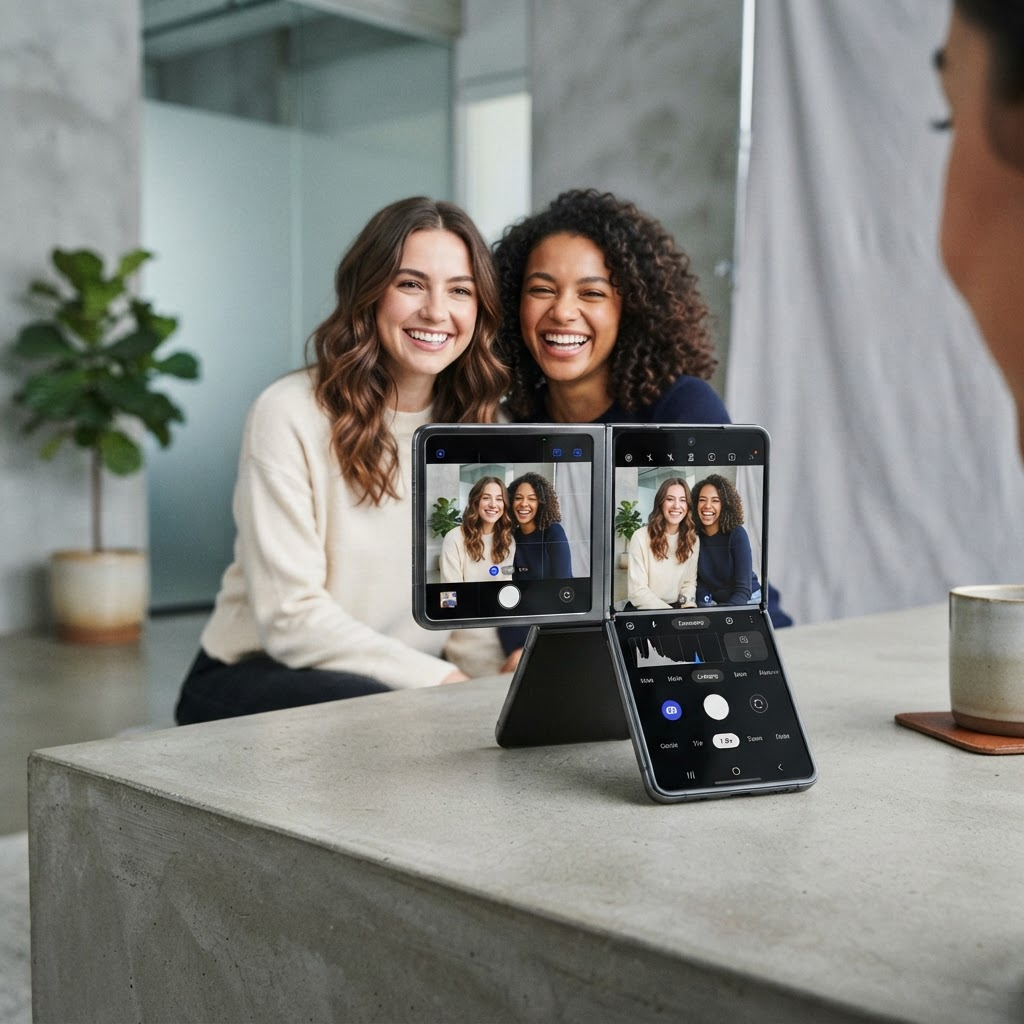
Most foldable camera features are described as hardware tricks. Apple’s most interesting iPhone Duo ideas are social: let the subject see the frame, remove the race against a timer, help a child look toward the lens, and include nearby people in a call without passing the phone around.
Apple names four features around that idea: Duo Preview, Smart Take, Kid Cue, and Duo FaceTime. Each is confirmed in the official product material.
Duo Preview: the subject sees the shot
Duo Preview uses the outer display as a live view while the photographer works with the rear camera system. The subject can check pose and framing instead of relying on verbal directions.
That changes the workflow. The photographer remains responsible for exposure, timing, and composition, but the subject can catch a cropped hand, closed eye, or tilted horizon before the shutter fires.
Privacy matters. A preview should appear only when intentionally enabled, and sensitive camera controls should remain on the photographer’s side. Apple’s developer camera session is the primary reference for apps building a similar multi-display experience.
Smart Take: timing without the sprint
Apple says Smart Take can detect when everyone is ready and take the picture. The practical value is not simply automation; it lets the person who set up the shot join the group without racing a timer.
Use it when the device is stable and everyone understands that capture may happen automatically. For formal portraits or unpredictable movement, manual control may still be preferable.
Smart Take should not be confused with a promise that every frame will be perfect. Subject readiness, focus, motion, lighting, and composition remain separate problems.
Kid Cue: attention on the outer display
Kid Cue plays animations on the outer display to draw a child’s eyes toward the lens. Apple specifically describes playful animations, including Peanuts content in its marketing material.
The feature is best understood as an attention aid, not a guarantee. Keep sessions short, avoid forcing a reaction, and capture candid alternatives. The outer display’s position close to the rear camera is what makes the idea useful: the child looks near the lens rather than toward the photographer’s waving hand.
Duo FaceTime: widen the call
Duo FaceTime lets nearby friends participate through the outer display. Instead of rotating the phone or crowding one side, people around the device can see and be seen from another surface.
This is a different problem from Duo Preview. Preview supports the subject of a photo; Duo FaceTime extends a live conversation. Developers should not treat every external-display camera experience as the same scene.
Which camera is doing what
Apple’s specifications list a 48MP Fusion Main camera, a 48MP Fusion Ultra Wide camera, a 12MP Center Stage outer front camera, and an under-display inner FaceTime camera. The under-display camera prioritizes an uninterrupted inner screen, while the rear system remains the stronger choice for high-quality capture.
Duo Preview is compelling because it combines the rear camera’s quality with subject-facing feedback. That is the key tradeoff: the person in the frame gets a view without forcing the photographer to use the lower-priority inner camera.
A five-step workflow
- Place iPhone Duo on a stable surface or tripod-compatible support.
- Choose the rear camera and frame the background.
- Enable the appropriate outer-display preview intentionally.
- Confirm everyone understands whether Smart Take or a manual shutter will be used.
- Review the result on the inner display without closing the camera state.
For children, insert Kid Cue only where it helps. For groups, keep a manual backup frame in case automatic timing catches motion.
What remains to test
Apple confirms the features, but independent testing still needs to assess low-light preview lag, battery use with two active displays, behavior with third-party camera apps, and whether Smart Take performs consistently across group sizes.
Bottom line
iPhone Duo’s camera story is less about folding the phone into a tripod and more about sharing visual context. Duo Preview gives subjects agency, Smart Take removes a timing chore, Kid Cue addresses attention, and Duo FaceTime uses the second display for participation. Those are documented features; how valuable they feel will depend on real-world reliability.
From the maker
Get PromptSlate Studio on the App Store
Write, prompt and record in one focused workspace. Out now — $9.99 one-time, no subscription. Every download supports independent development of new apps.
See PromptSlate Studio details · Also in the works: DuoSketch
Spotted something to fix, or an app we should cover?
This article is independent research, cross-checked against Apple's developer documentation. If something's out of date, or you know an app that deserves a look, let us know — and if you're building for iPhone Duo yourself, we're happy to talk.
hola@ayudantedigital.es