iOS 27 Edge-to-Edge Apps: Fix Letterboxing Before iPhone Duo Ships
Why older builds can look constrained on iPhone Duo and how to migrate navigation, safe areas, launch screens, and orientation support with the iOS 27.1 SDK.
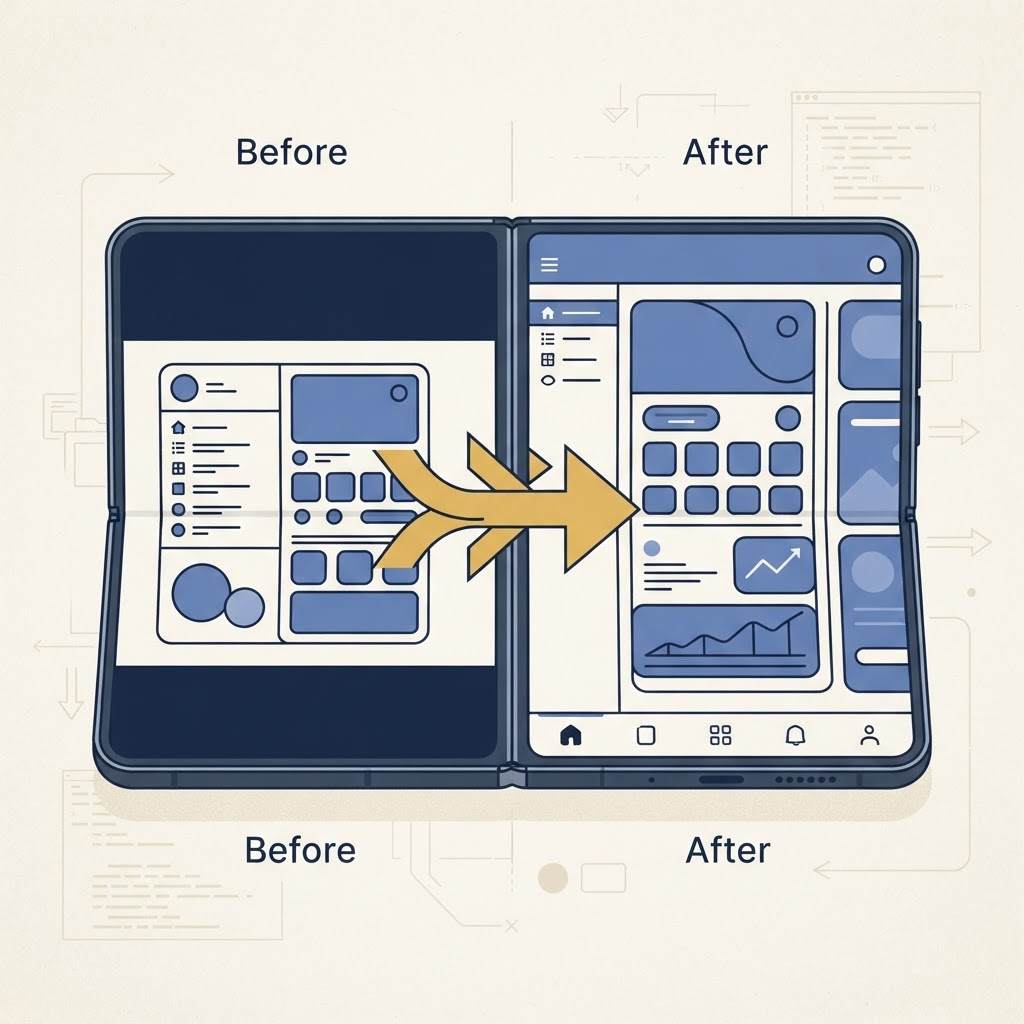
Rebuilding with Xcode 27.1 is the starting line, not the finish. Once the system grants more space, old assumptions about safe areas, bars, orientation, and fixed widths become visible.
Why letterboxing happens
Compatibility behavior protects apps that have never seen a foldable window. It reduces the chance that a critical control lands under an unfamiliar region or that a rigid layout stretches into nonsense. For users, however, black or unused margins make a premium large display feel wasted.
The correct response is not to force every view to the physical edges. It is to adopt the current SDK, then let system containers and safe areas describe where content belongs.
Audit the launch contract
Make sure the app has a modern launch screen and declares the orientations it genuinely supports. iOS 27 changes how resizing expectations interact with historical full-screen assumptions. Do not use an orientation restriction as a substitute for adaptive design.
Games and specialized camera tools may have legitimate presentation requirements. Test those intentionally and document why. Most content, commerce, communication, and productivity apps should adapt.
Replace fixed frames with relationships
Search the codebase for hardcoded screen widths, magic sidebars, manual status-bar offsets, and calculations based on UIScreen.main. These patterns are fragile in a scene-based, resizable environment.
Prefer:
- safe-area anchors and readable-content guides;
- Auto Layout priorities rather than fixed widths;
- SwiftUI adaptive grids and flexible frames;
- scene-specific geometry;
- scrollable content when localization or accessibility increases size.
The fold is not a universal forbidden stripe. Follow the values and containers supplied by the system rather than inventing a permanent center gutter.
Navigation needs special attention
When space expands, a tab-based or stack-based app may benefit from a sidebar and detail column. That transformation should preserve selection and navigation history. Standard components gain platform improvements automatically and are more likely to adopt the current iOS 27 visual language correctly.
Custom navigation bars should be audited for hit targets, contrast, scroll-edge behavior, and content extending behind materials. Do not copy the appearance of Liquid Glass while ignoring its accessibility and layering behavior.
Safe areas are dynamic
A safe area can change when the keyboard appears, when a sheet changes presentation, or when the scene geometry changes. Read it where layout happens. Caching insets at launch is likely to create stale geometry.
Test media and maps separately because they often extend visually beneath controls while keeping interactive content inside safe regions. Edge-to-edge means using the canvas thoughtfully, not placing every button at the edge.
Migration sequence
A practical migration can happen in stages:
- Build with Xcode 27.1 and record every warning.
- Establish a baseline screenshot and interaction suite.
- Replace global-screen calculations with scene geometry.
- Modernize navigation and modal presentation.
- Fix safe-area and keyboard behavior.
- Test continuous resizing and state preservation.
- Profile before and after the migration.
For UIKit projects, complete the UIScene modernization guide early. SwiftUI teams can use our adaptive size-class guide to avoid device-name branches.
Do not hide compatibility problems
It may be tempting to keep the constrained mode because it appears stable. That choice leaves useful space unused and postpones the work until customer reviews expose it. Modernizing now also improves Stage Manager, accessibility sizes, future iPhones, and other resizable contexts.
The best edge-to-edge update is not the one with the most pixels filled. It is the one where users never notice the app had to adapt.
From the maker
Try DuoCreator on iPhone Duo
Script, camera, and a voice-following teleprompter on the two screens of iPhone Duo. $9.99 one-time at launch. Signing up supports independent development of new apps and technologies for iPhone Duo.
See DuoCreator details · Also in the works: DuoSketch
Spotted something to fix, or an app we should cover?
This article is independent research, cross-checked against Apple's developer documentation. If something's out of date, or you know an app that deserves a look, let us know — and if you're building for iPhone Duo yourself, we're happy to talk.
hola@ayudantedigital.es