Building DuoCreator — Part 3: The AVFoundation Camera Engine Behind the UI
Inside CameraEngine: capability-driven controls, safe camera switching, temporary-file recording and why the capture pipeline stays hinge-unaware.
A beautiful recording interface is worthless if the capture pipeline is fragile.
For DuoCreator I deliberately separated the camera engine from the iPhone Duo layout work. SwiftUI can reorganize the studio around the hinge, but AVFoundation still needs a predictable lifecycle: permissions, device discovery, inputs, outputs, recording, failure handling and cleanup.
A dedicated capture object
CameraEngine is an NSObject and ObservableObject because it bridges two worlds: AVFoundation's delegate-based capture APIs and SwiftUI's observable state.
It owns an AVCaptureSession, video and audio inputs, movie output, audio-data output, device capabilities and recording state.
Capture-session configuration is not performed casually on the main actor. Session work goes through a dedicated serial queue. UI state is published back where SwiftUI expects it.
That distinction is important. Camera setup can be expensive, and AVFoundation has its own threading expectations.
Capability-driven controls
One thing I did not want was a fake "Pro" panel containing controls that the current camera cannot actually perform.
The engine discovers capabilities and exposes only meaningful ranges or flags to the UI.
DuoCreator currently supports, when the active device allows it:
- camera switching
- zoom
- tap focus and exposure
- exposure bias
- locked focus position
- locked white-balance temperature
- torch
- stabilization
- resolution preference
- frame-rate preference
The UI therefore asks the engine what is possible rather than assuming every camera is identical.
Safe camera switching
There is an intentionally conservative decision in the current build: switching camera while a movie is recording is ignored.
That is not as flashy as promising seamless lens and camera changes, but I would rather ship a predictable recording lifecycle first.
The technical decision document in the project says the same thing about pause/resume: record and stop are implemented safely; pause is not exposed until seamless behavior is verified on the shipping iOS 27.1 and Duo combination.
This is a recurring theme in DuoCreator: don't turn an unverified beta-era behavior into a product promise.
One temporary file per take
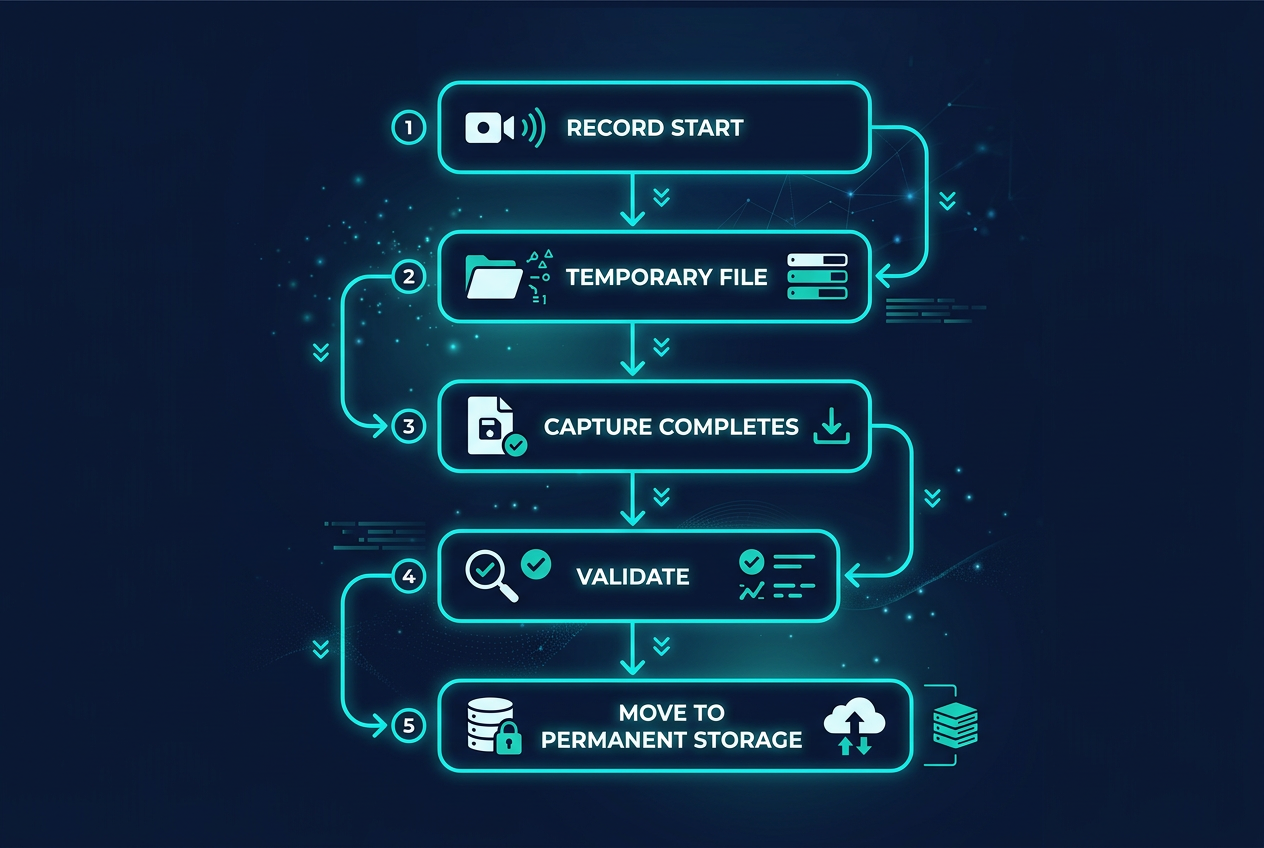
When recording starts, the engine creates a unique temporary destination.
Only after AVFoundation reports a successful completion does the app move the movie into the project's permanent storage.
The high-level lifecycle is:
start recording
      ↓
unique temporary .mov
      ↓
AVCaptureFileOutput delegate completes
      ↓
validate success
      ↓
move into Projects/<id>/Takes/<id>.mov
That gives the app a clean boundary between "capture in progress" and "this is a real take that belongs to the project."
Recoverability matters
Movie output is configured to write fragments periodically. The reason is not a demo feature; it is defensive engineering.
Creators may record longer takes. Devices run out of space, apps encounter interruptions, and beta software can behave unexpectedly. I want the recording format and lifecycle to have a better chance of leaving recoverable media than an all-or-nothing approach.
DuoCreator also checks available storage before starting a take. If capacity is dangerously low, recording should fail early with a useful message rather than discovering the problem halfway through a creator's best take.
Audio has two consumers
The capture session includes movie audio, but DuoCreator also needs live audio samples.
Those samples feed metering and the optional Voice Follow feature discussed later in the series.
I intentionally reuse the capture audio stream rather than opening a second microphone pipeline. One microphone path is easier to reason about, avoids unnecessary duplication and keeps speech following tied to the audio being captured.
SwiftUI preview, AVFoundation underneath
The camera preview uses AVCaptureVideoPreviewLayer wrapped for SwiftUI.
This is one of those places where "pure SwiftUI" is not a useful goal. Apple's mature capture layer already solves the job. UIViewRepresentable is the bridge, not a failure of architecture.
The result is that StudioView can compose a normal SwiftUI hierarchy around a real AVFoundation preview.
The foldable part stays above this layer
Notice what this article has barely mentioned: the hinge.
That is intentional.
CameraEngine does not need to know whether the device is flat, compact or sitting like a tiny laptop. The Studio may move the preview and controls, but the session remains the same capture session.
This separation is what lets the new form factor become a UI opportunity instead of infecting the recording code with device-specific branches.
What I would test before calling it production-ready
For a camera app, happy-path tests are not enough. I care about denied permissions, backgrounding, insufficient storage, unsupported frame rates, device changes, interrupted recordings and rapid UI interactions around start/stop.
iPhone Duo adds another family of tests: change pose while previewing, change pose during recording, and ensure layout transitions never tear down the capture state unexpectedly.
The next article will move to the other half of DuoCreator's identity: the teleprompter, and why its scrolling clock is based on elapsed display time rather than "move N pixels every frame."
Follow or support the development of DuoCreator
DuoCreator is an independent project currently in development. This series documents the real engineering work behind the app as it evolves toward release.
If you represent a company and would like to sponsor DuoCreator, collaborate on the project, explore an integration, provide hardware or services for testing, or discuss another form of partnership, contact us at hola@ayudantedigital.es.
We're especially interested in collaborations that genuinely add value for creators and the emerging iPhone Duo ecosystem.
Apple references
- Apple Developer — Get ready for iPhone Duo
- Apple Human Interface Guidelines — Designing for iPhone Duo
- Apple Developer — Xcode 27.1 Beta Release Notes
- Apple Developer — Xcode system requirements
- Apple Developer — DeviceHinge
- Apple Developer — CameraCaptureAccessory
- Apple Developer — Foundation Models / SystemLanguageModel
- Series: Building DuoCreator for iPhone Duo
- Project: AppsForDuo / DuoCreator
- Suggested canonical home: appsforduo.com
Spotted something to fix, or an app we should cover?
This article is independent research, cross-checked against Apple's developer documentation. If something's out of date, or you know an app that deserves a look, let us know — and if you're building for iPhone Duo yourself, we're happy to talk.
hola@ayudantedigital.es