Building DuoCreator — Part 8: Giving Script AI Image Context Without Inventing Product Facts
How DuoCreator uses Vision OCR and image classification to feed script generation, while explicitly labeling uncertain visual labels as uncertain, never as fact.

A common creator workflow starts with an object or screenshot rather than a written brief.
You might want to make a product video from a few photos, explain a UI screenshot, or build a script around visible packaging.
That creates an obvious AI feature: let the user select images and use them as context for script generation.
It also creates an obvious failure mode: the model confidently invents details that are not visible.
DuoCreator's first image-context pipeline is intentionally conservative.
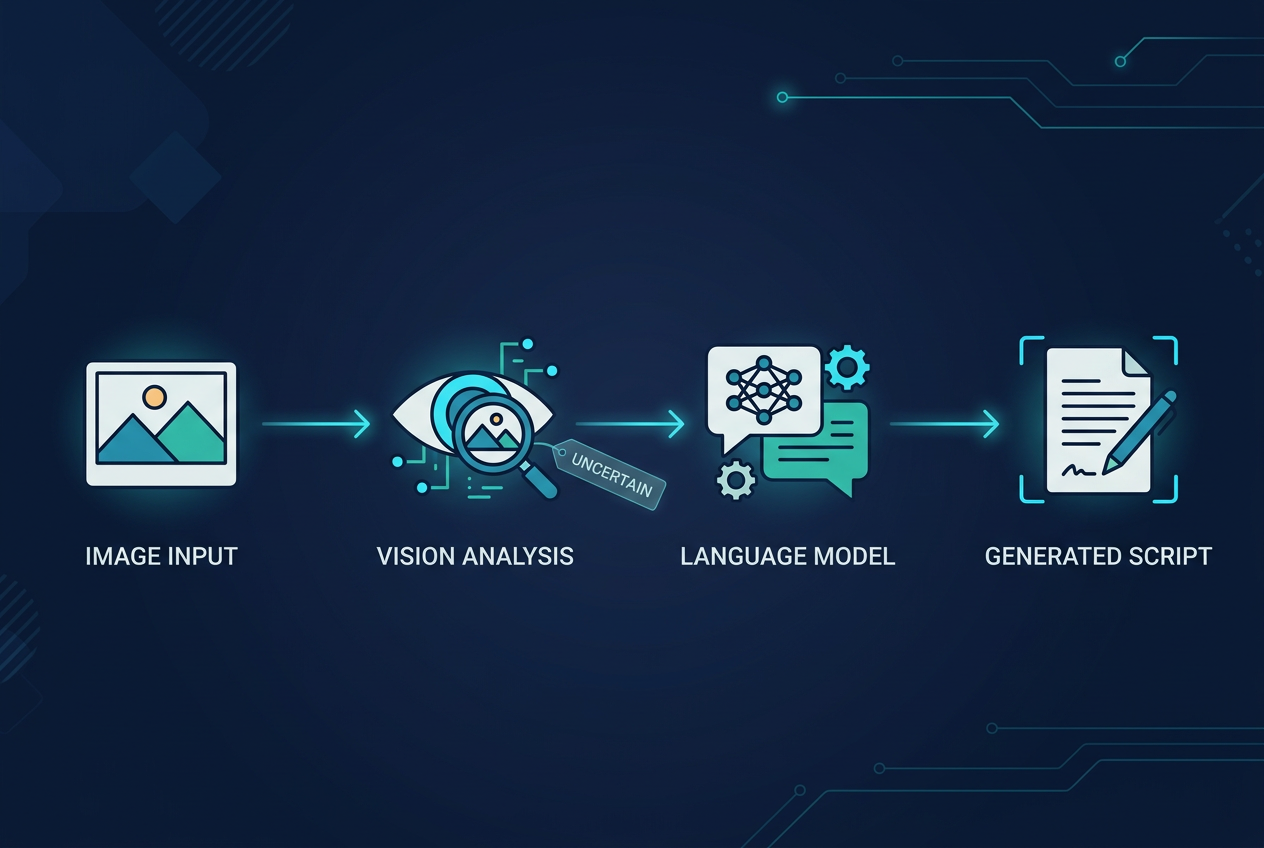
Vision before language generation
Selected images are loaded through PhotosUI and inspected with Apple's Vision framework.
The current analyzer performs two tasks:
- text recognition with
VNRecognizeTextRequest - image classification with
VNClassifyImageRequest
Recognized text can be strong evidence when it is actually visible in the image. Classification labels are weaker and are treated accordingly.
The analyzer packages the result as context for Creator Assist rather than asking the language model to make unsupported assumptions.
Confidence is not truth
The implementation filters low-confidence classifications and includes only a small set of stronger labels.
More importantly, the prompt text labels them as uncertain visual context.
A simplified example of the generated context is:
Image 1:
visible text: ...
Vision classifications: ...
Treat classifications as uncertain visual context,
not guaranteed facts.
If no reliable facts are detected, the analyzer says so explicitly.
That may seem overly cautious, but it is exactly what I want from a script-writing product. A creator can fix missing detail. It is harder to notice a plausible false claim that an assistant invented.
OCR has a different role
Visible text is especially useful for product videos.
Packaging may contain a product name, a feature label or a short instruction. A screenshot may contain headings and UI copy.
Vision OCR gives the script generator something concrete to work with.
But even OCR needs product discipline. Extracted text does not automatically tell us what every phrase means. Creator Assist is instructed not to invent factual details beyond the supplied context.
Keep the user's idea in the loop
Image context does not replace the creator's instruction.
The generation request still contains the user's idea, selected tone, format and target duration.
That matters because the same photo can support completely different videos: a quick product introduction, a tutorial, a personal recommendation, an educational explanation, or a short social hook.
Vision describes. The user directs. The language model writes.
Why this belongs in a camera app
At first glance, Vision + Foundation Models sounds like a separate AI product.
But the workflow makes sense when it ends at the record button.
A creator can gather context, generate a first script, refine it, load it into the teleprompter and record inside the same project.
The AI is useful because it reduces setup work around recording.
The privacy surface should stay understandable
DuoCreator stores its project metadata locally and keeps video as local files. Creator Assist's current language generation uses Apple's on-device SystemLanguageModel when available.
That does not mean every future feature must be described with a vague "everything is private" slogan. Each capability should be documented according to what it actually does.
For this image feature, the implementation uses local Apple frameworks to extract context before generation. If the architecture changes later, the product copy and privacy information need to change with it.
A useful AI design principle
Never let uncertainty disappear between layers.
Vision knows a classification has confidence. The context builder should preserve the fact that it is uncertain. The language-model prompt should preserve it again. The generated script should not upgrade it into a fact.
That chain is more important to me than adding another flashy AI button.
Next I will return to media engineering and show how DuoCreator separates SwiftData metadata from actual movie files, including safe take import, deletion, storage checks and saving to Photos.
Follow or support the development of DuoCreator
DuoCreator is an independent project currently in development. This series documents the real engineering work behind the app as it evolves toward release.
If you represent a company and would like to sponsor DuoCreator, collaborate on the project, explore an integration, provide hardware or services for testing, or discuss another form of partnership, contact us at hola@ayudantedigital.es.
We're especially interested in collaborations that genuinely add value for creators and the emerging iPhone Duo ecosystem.
Apple references
- Apple Developer — Get ready for iPhone Duo
- Apple Human Interface Guidelines — Designing for iPhone Duo
- Apple Developer — Xcode 27.1 Beta Release Notes
- Apple Developer — Xcode system requirements
- Apple Developer — DeviceHinge
- Apple Developer — CameraCaptureAccessory
- Apple Developer — Foundation Models / SystemLanguageModel
- Series: Building DuoCreator for iPhone Duo
- Project: AppsForDuo / DuoCreator
- Suggested canonical home: appsforduo.com
Spotted something to fix, or an app we should cover?
This article is independent research, cross-checked against Apple's developer documentation. If something's out of date, or you know an app that deserves a look, let us know — and if you're building for iPhone Duo yourself, we're happy to talk.
hola@ayudantedigital.es