Building DuoCreator — Part 5: Making the Teleprompter Follow the Speaker
How Voice Follow reuses the camera's microphone stream, matches partial speech transcripts against the script, and proposes — never forces — teleprompter seeks.

Fixed-speed teleprompters have one unavoidable problem: humans do not speak at a fixed speed.
We pause. We repeat a sentence. We improvise. We slow down for emphasis.
DuoCreator's optional Voice Follow mode experiments with a different model: listen to the words being spoken, align them with the script, and move the existing teleprompter engine toward the matching position.
Reusing the recording audio
The camera pipeline already receives microphone audio.
Rather than creating another microphone capture stack, CameraEngine exposes the audio sample stream to interested features. VoiceFollowEngine can append those CMSampleBuffer samples to a speech-recognition request.
That keeps the architecture simpler:
microphone
   ↓
AVFoundation capture
   ├── movie recording
   ├── audio meter
   └── Voice Follow
One source, multiple consumers.
Permission and availability first
Voice Follow is optional.
The engine requests Speech authorization and checks whether an SFSpeechRecognizer is available for the target locale. If recognition cannot run, the normal fixed-speed teleprompter remains usable.
That fallback is important. A smart feature should not make the basic feature unreliable.
The current prototype uses US English for the recognizer because the initial product is being developed around an English-language creator workflow. Localization can broaden that later.
Partial results make it feel alive
The speech request enables partial results.
Waiting for a final transcript would make a teleprompter follower feel delayed. Partial transcription lets the engine repeatedly ask: "where in the script does the recent speech appear to be?"
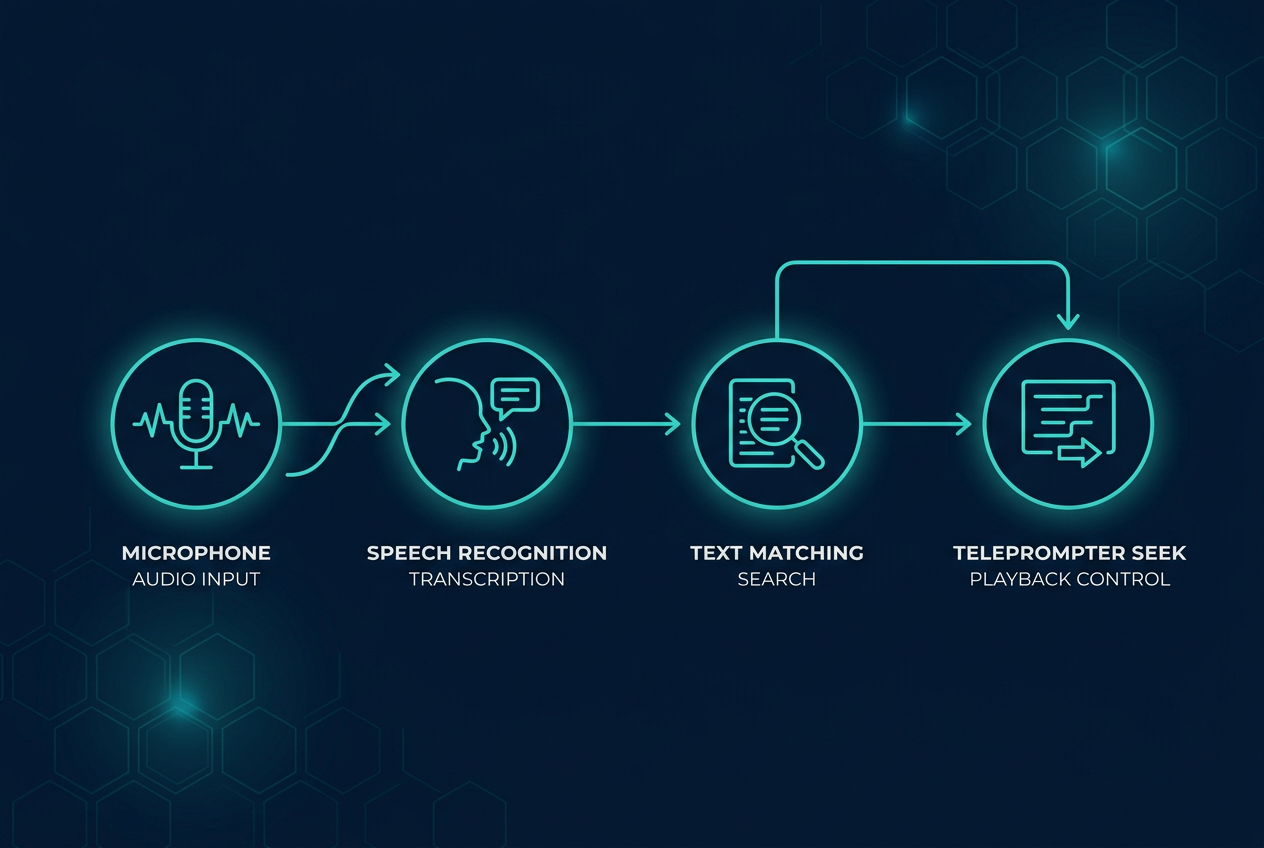
The production code normalizes both script and recognized text into lowercase alphanumeric words. It then looks at a small suffix of recently heard words and searches the reference script for the best matching window.
I won't reproduce the complete matching implementation here, but the core idea is intentionally understandable:
- Normalize the script.
- Normalize the partial transcript.
- Take the most recent handful of recognized words.
- Compare them with candidate windows in the script.
- Require a minimum score.
- Convert the best matching position into progress from 0 to 1.
- Ask the existing teleprompter engine to seek.
Why not let speech own the scroll view?
Because speech recognition is uncertain.
The teleprompter remains the source of truth for reading position. Voice Follow merely proposes progress updates when confidence is good enough.
This separation gives me room to improve matching later without rebuilding the UI.
For example, a future version could incorporate timing, word confidence, phrase boundaries or a more sophisticated alignment algorithm. The interface contract can stay the same: provide a sensible progress value.
Repetition is the hard case
Imagine a script containing:
and later:
A naive search for "we're going to build" can jump to the wrong location.
That is why even this first implementation uses a short sequence of recent words rather than matching a single word. It also ignores weak matches.
A production teleprompter should prefer staying slightly behind over suddenly jumping to an unrelated paragraph.
Privacy and product expectations
Speech features deserve clear product communication.
Voice Follow should not be described as magic. Availability can depend on system capabilities and permissions. When on-device recognition is supported, the request asks for it, but the UI still needs to handle cases where the feature cannot be used.
The base teleprompter must always work.
That principle also appears in DuoCreator's AI features: intelligence enhances the creator workflow but does not become a prerequisite for writing a script or recording a video.
Duo makes the feedback loop visible
In tabletop mode, the creator can have camera framing and script above while controls remain below. Voice Follow reduces the need to touch those controls during a take.
That combination is where the feature starts to make product sense.
The hinge isn't directly involved in speech recognition. It changes the physical situation in which speech following becomes valuable.
That is a useful distinction when designing for new hardware: not every new feature needs a new hardware API. Sometimes the hardware makes an existing software capability dramatically more useful.
Next: one of the most iPhone-Duo-specific pieces of the project — presenting a teleprompter on the outer display during camera capture with Apple's CameraCaptureAccessory.
Follow or support the development of DuoCreator
DuoCreator is an independent project currently in development. This series documents the real engineering work behind the app as it evolves toward release.
If you represent a company and would like to sponsor DuoCreator, collaborate on the project, explore an integration, provide hardware or services for testing, or discuss another form of partnership, contact us at hola@ayudantedigital.es.
We're especially interested in collaborations that genuinely add value for creators and the emerging iPhone Duo ecosystem.
Apple references
- Apple Developer — Get ready for iPhone Duo
- Apple Human Interface Guidelines — Designing for iPhone Duo
- Apple Developer — Xcode 27.1 Beta Release Notes
- Apple Developer — Xcode system requirements
- Apple Developer — DeviceHinge
- Apple Developer — CameraCaptureAccessory
- Apple Developer — Foundation Models / SystemLanguageModel
- Series: Building DuoCreator for iPhone Duo
- Project: AppsForDuo / DuoCreator
- Suggested canonical home: appsforduo.com
Spotted something to fix, or an app we should cover?
This article is independent research, cross-checked against Apple's developer documentation. If something's out of date, or you know an app that deserves a look, let us know — and if you're building for iPhone Duo yourself, we're happy to talk.
hola@ayudantedigital.es